One digital paralegal. Every case at once. Nobody has to ask.
Work is finished the moment it arrives, inside the software your firm already uses, even the AI tools that still wait for a person to work them. Execute works the AI tools for you. You review and approve everything.
Request a demo, and we’ll run Execute on a few of your real cases. You watch it work.
Prefer to talk? Call 212 206 2520. Or of a sample case.
The work of as many paralegals as you need, at half the cost of one hire.*
*Pricing depends on firm size and the products included in your subscription.
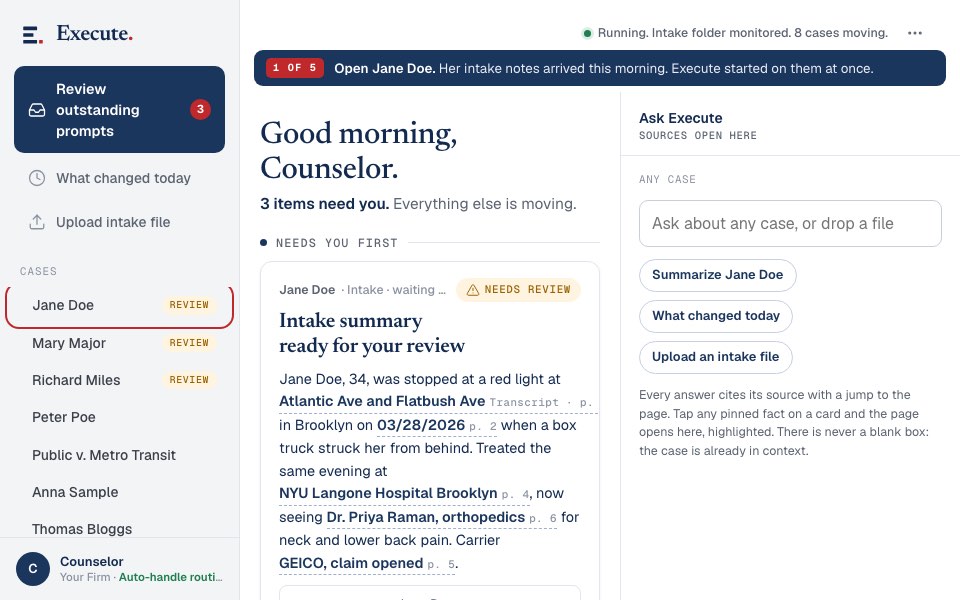
Execute receives the intake notes, drafts the retainer and the HIPAA authorizations, and with your approval sends them to the client for signature.
Your firm doesn’t have a staffing problem. It has a bottleneck.
Every litigation firm runs the same way. Your paralegals spend most of their day on the admin work every case needs: the drafting, the forms, the record requests, the follow up nobody got to. They can only push one case forward at a time, so every other case waits for them to come back to it. Work stops at six and picks back up tomorrow morning. Hiring adds a salary, benefits, training, and turnover, and buys you one more person working cases in order, one after another, during business hours. Every other case still waits for the one in front of it to finish.
Read moreRead less
Execute breaks the bottleneck. It takes the paper pushing off every desk in your firm, on every case at once, starting the second each task comes in. It works all day, every day, nights and weekends included. Nothing sits in a pile, because there is no pile.
Your paralegals have more important things to do than push paper. With the admin work already done, their day goes to the work that needs a person: calling clients, preparing witnesses, handling the moments that need judgment and a human touch. Your cases resolve faster, and your people spend their day on the work that moves a case forward, the work they should have been doing all along.
You still review and approve everything. You just never wait for it.

Three cases move by six. The other five wait for tomorrow.
- Marbury v. MadisonDone
- Brown v. BoardDone
- Miranda v. ArizonaDone
- Gideon v. WainwrightWaiting
- Mapp v. OhioWaiting
- Terry v. OhioWaiting
- Katz v. United StatesWaiting
- Loving v. VirginiaWaiting
Three cases moved. Five wait for tomorrow morning.
- Marbury v. MadisonDone
- Brown v. BoardDone
- Miranda v. ArizonaDone
- Gideon v. WainwrightDone
- Mapp v. OhioDone
- Terry v. OhioDone
- Katz v. United StatesDone
- Loving v. VirginiaDone
Eight cases moved, in the same minute, and it keeps working after six.
Eight cases, one afternoon, both sides on the same clock. Three move on the left and five wait for tomorrow. Nothing sits in a pile, because there is no pile.
Everything a paralegal does. On every case. Before anyone asks.
Execute does everything your paralegal does, on every case, all at once. The moment an intake is completed, the opening documents are drafted and sent out for signature. The moment the retainer is signed, every record is requested and chased until the last one is in the file, and the summons and complaint are drafted the day it lands. Execute watches your court’s electronic filing system and drafts the response to every demand the day it comes in. The routine work of litigation happens automatically, on every case you have, without anyone assigning it.
Read moreRead less
Nothing waits for a prompt, an upload, or a free pair of hands. Execute reads what each case needs and does it: the intake paperwork and authorizations, the record requests and the follow up, the complaint, the discovery responses, every deadline on the calendar. The tools your firm already owns each do one piece when someone runs them. Execute runs them, and does the rest of the paralegal’s job around them, on every case at the same time.
Everything arrives done. An attorney reviews and approves before anything leaves the firm. That is the whole job description: Execute drafts, chases, and files the routine work of your practice, simultaneously and instantly, on every case you have, and your lawyers stay in charge of every decision that matters.

Every step runs itself until it needs your approval.
- 01The client calls
You have your intake meeting. That is the last thing anyone has to start.
- 02The paperwork is drafted
Immediately and automatically, before anyone has typed a word.
- 03The retainer goes out for signature
Execute follows up until it comes back signed.
You approve
- 04Records requested, tracked, chased
Without anyone assigning it. Execute never forgets to follow up.
- 05The last record arrives
The summons and complaint are drafted and ready to file.
You approve - 06Filed the day it is ready
Not the day someone gets around to it.
- 07A discovery demand lands
Execute sees it on the court's system, pulls it, and drafts your response from your file.
- 08Everything arrives done
An attorney reviews and approves before anything leaves the firm.
You approve
Every step that leaves the firm stops at the same gate. An attorney reviews and approves before anything leaves the firm.
Start with the stage that hurts most. Add the rest when you’re ready.
Intake
From the intake call to the signed retainer, without anyone typing.
Open file Product No. 02Prelitigation
Records requested, chased, and in the file. The complaint drafted the day the last record lands.
Open file Product No. 03Litigation
Discovery demands pulled from the court’s system and answered from your file. Every deadline tracked.
Open file Product No. 04Motion Practice In development
Dispositive motions drafted in your firm’s voice.
Open fileKeep every piece of software you have. Even your AI tools.
No migration. No new logins. No training, for anyone. Execute uses your case management system, your email, your signature software, and the rest of your stack the way a new hire would, except it already knows how everything works on day one.
Read moreRead less
We don’t compete with your AI tools. We operate them. The subscriptions your firm already pays for become more useful, because your digital paralegal runs them for you.
And if something is missing, Execute fills the gap. No AI system? Execute is that. No case management system? Execute handles it.
Nothing is replaced. Every tool you own gets operated.
- Your case management systemExecute reads the file and puts the finished work back into it.Kept
- Your email and faxIt sends the record requests and chases them until they come back.Kept
- Your signature softwareIt sends the retainer out and follows up until it is signed.Kept
- Your word processorIt drafts in your firm's templates, in your firm's voice.Kept
- The court's systemIt watches for new demands, pulls them, and answers from your file.Watched
- Your AI toolsIt runs them for you, instead of waiting for a person to work them.Operated
- Anything you do not haveExecute does that part itself.Added
Nothing gets replaced and nothing gets learned. We don't compete with your AI tools. We operate them.
Half the price of a paralegal. The output of an entire law office.
One subscription does the work your whole support staff does today: the intake paperwork, the records, the complaints, the discovery responses, on every case at once. It costs about half of what one paralegal hire costs, and it adds no salary, no benefits, and no HR to your firm. When your caseload grows, Execute is already working the new cases too, and your price doesn’t climb with every file you sign.*
*Pricing depends on firm size and the products included in your subscription.
About half the cost of one hire, working every case at once.
Illustrative. Not measured data.
One case at a time, during business hours.
Every open case at once, all day, every day.
The bars compare cost, the rows below them compare output, and both are illustrative rather than a measured result. Half the price. The output of an entire law office.
Any case, any stage.
Hand Execute a case and it knows exactly where you are. There is no onboarding project, and nobody sits with it walking through every file. It reads your system the way an experienced hire would read the file, and gets to work. Your entire existing caseload speeds up the day you start.
Read moreRead less
Your files stay yours. Execute works inside your firm’s own systems, under your firm’s control, and nothing moves without your approval. See how your files stay yours
Request a demo, and we’ll run Execute on a few of your real cases. You watch it work.

Three cases at three stages, all moving the same day.
- Signed last weekMoving
- Records half inMoving
- Deep in discoveryMoving
Every one of them starts moving on the same day, from wherever it already sits.
Three cases at three different stages, one start date. Your entire existing caseload speeds up the day you start.
Your people become the reviewers.
The grinding work leaves their desks, because their job becomes review and approval. The drafting marathons, the records chase, the panic before a filing deadline: Execute finishes that work the moment it appears. Sleepless nights and lost weekends become a thing of the past, because the work gets done as soon as it comes in, not the night before it’s due.
Read moreRead less
The judgment calls stay human. Your people finally have the time to make them well.
The grinding work leaves. The judgment calls stay.
Leaves their desks
- The drafting marathonsExecuted
- The records chaseExecuted
- The panic before a filing deadlineExecuted
- The night before it is dueExecuted
Stays with your people
- Review and approvalHuman
- Calling clientsHuman
- Preparing witnessesHuman
- The judgment callsHuman
Better work, done at better hours. The judgment calls stay human.
The only clock left is the court’s.
We won’t promise you a court date. What we can promise: every delay your firm controls goes to zero. The only thing you wait on is reviewing the final work product. Drafting, filing, record requests, the follow up nobody got to: none of it waits on a person anymore. When the work is always done, cases resolve faster, and so do fees.

Every delay your firm controls goes to zero.
Illustrative. Not measured data.
- DraftingZero
- FilingZero
- Record requestsZero
- The follow up nobody got toZero
- Reviewing the final work productYours
- The court's calendarThe court's
Every mark is the same length, because this compares what still waits on a person, not how long it takes. The dotted outline is the wait today. The four at the top go to zero. Your own review and the court's calendar stay.
The work that used to wait on a person does not wait any more. Every delay your firm controls goes to zero.
Built inside a real law firm.
Execute was built by a New York trial lawyer inside a real law firm, on a real caseload, and engineered by a cofounder who spent two decades building production systems for enterprises, including the automation behind a public company’s highest volume operations. It was not designed in a lab by people who have never worked in a law firm or stood in a courthouse.

A New York trial lawyer. Built Execute inside a real law firm, on a real caseload. Teaches AI and litigation at Cardozo Law.
Two decades building production systems for enterprises, including the automation behind a public company’s highest volume operations.
Asked by every managing partner.
A trigger covers the middle. Execute does all three.
Someone gathers the client's information and types it into your system.
Your team, todayYour case management system fires a template.
Your triggerSomeone tailors the template to the case and gets it to the attorney.
Your team, todayYour trigger covers this
Execute does all three
Keep your triggers. Execute is the paralegal that works them.
Can’t we just set up triggers in our case management system? +
Is this another AI drafting tool? +
Will it replace my staff? +
What software do I need? +
How do I know the work is good? +
What does it cost? +
*Pricing depends on firm size and the products included in your subscription.
Watch it work your cases.
Request a demo, and we’ll run Execute on a few of your real cases. You watch it work.
We read every request. No automated blasts.
Prefer to talk? Call 212 206 2520.